Extract Tables fromPDFs in Seconds
Data Extractio extracts tables from any PDF in seconds — upload your PDF, select the table area visually, and download clean data as Excel or CSV. Data Extractio supports both native-text PDFs and scanned PDFs via OCR. No software installation. No manual re-typing.


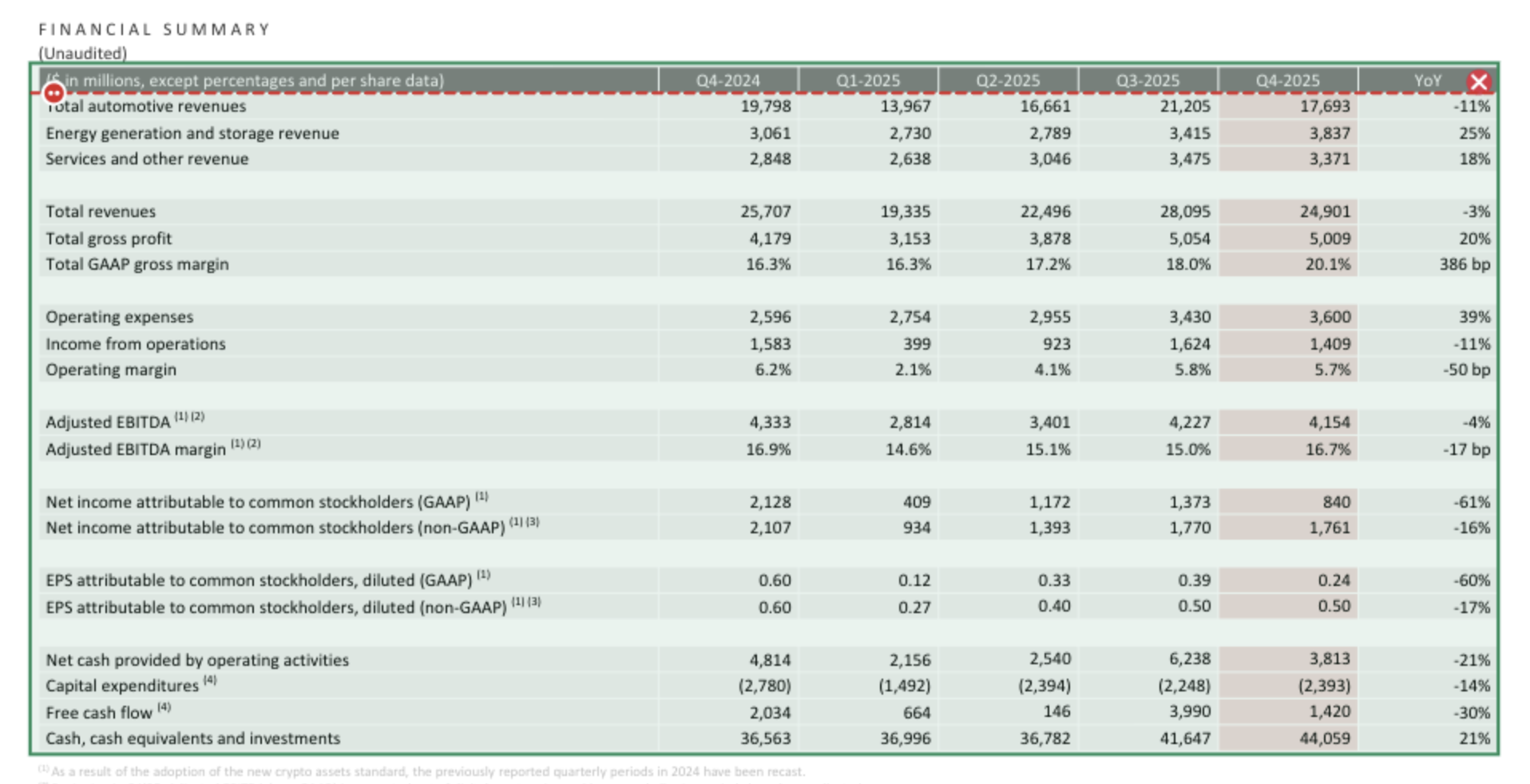
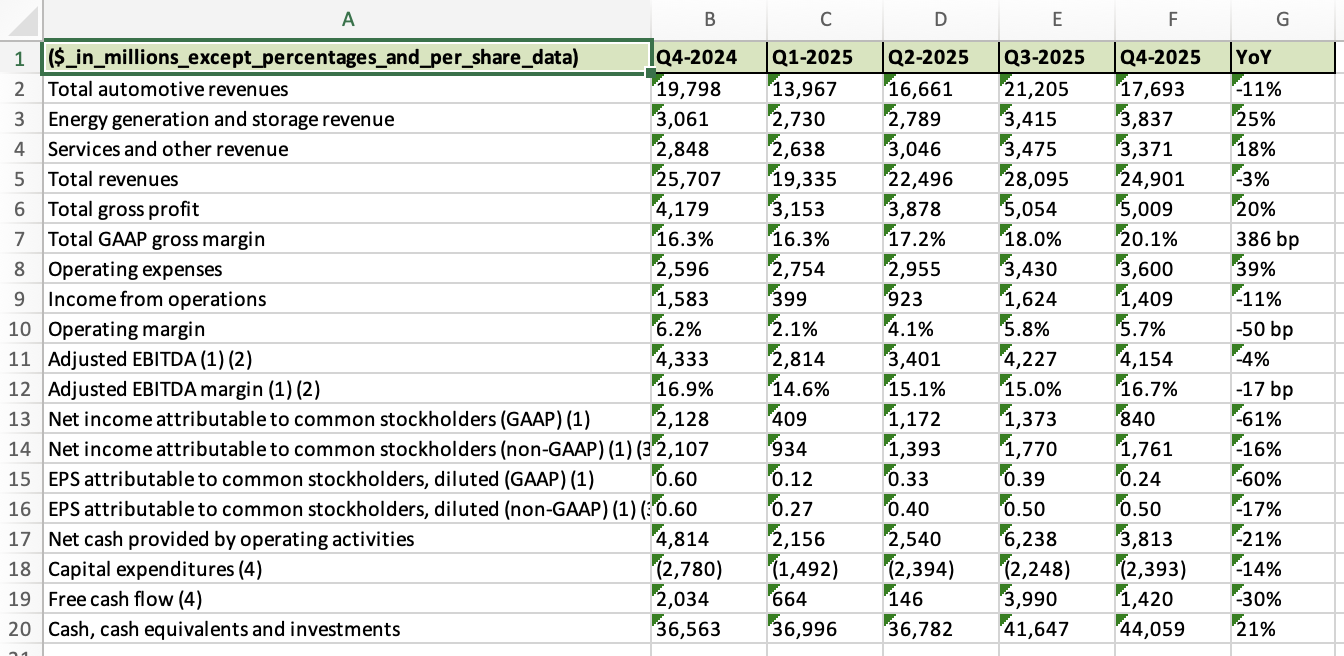
1. Upload PDF
Simply drag and drop your PDF file or click to browse
2. Select Table
Click and drag to select the table area you want to extract
3. Download Data
Get your structured data in Excel, CSV, or JSON format
Why Choose Our PDF Table Extractor?
Built for professionals who need reliable, fast, and accurate data extraction from PDFs.
Lightning Fast
Extract tables from PDFs in seconds with our optimized processing engine. No waiting around.
Visual Area Selection
Precisely define table extraction areas with our intuitive visual interface for maximum control.
100% Private
Your documents never leave our secure servers. We prioritize your privacy and data security.
Multiple Formats
Export your extracted data in Excel, CSV, JSON, or copy directly to your clipboard.
Simple, Transparent Pricing
One credit per file, not per page. Extract unlimited tables from any PDF.
Upgrade or downgrade anytime.
Free
Perfect for trying out our service
- 15 files per month
- 1 credit per file, not per page
- Excel export
- Email support
Starter
Best for individuals & freelancers
- 100 files per month
- 1 credit per file, unlimited tables
- Excel, CSV, JSON export
- Template saving
- Priority email support
Pro
For agencies & small teams
- 350 files per month
- Extract unlimited tables per file
- Everything in Starter
- Batch processing
- Priority support
Enterprise
For businesses & high-volume users
- 1,000 files per month
- No limits on tables or pages
- Everything in Pro
- Dedicated support
All paid plans include a 14-day money-back guarantee.
Need Credits Only?
Buy credits without a subscription. Perfect for one-time projects or occasional use.
50 Credits
Perfect for occasional use
- 50 files (one-time)
- 1 credit per file
- Valid for 12 months
- Excel export
200 Credits
Great for projects
- 200 files (one-time)
- 1 credit per file
- Valid for 12 months
- Excel export
500 Credits
Best value for bulk needs
- 500 files (one-time)
- 1 credit per file
- Valid for 12 months
- Excel export
Frequently Asked Questions
How do I extract a table from a PDF?
Upload your PDF, select the table area visually on the PDF viewer, choose lattice or stream mode, and click Extract. Your data downloads as Excel or CSV in seconds — no software installation required.
Can Data Extractio handle scanned PDFs?
Yes. Enable the OCR option before extracting. Data Extractio uses Tesseract to recognize text in scanned or image-based PDFs before running table extraction.
What export formats are supported?
Extracted tables export to Excel (.xlsx), CSV, and JSON. Invoice data exports to Excel and CSV.
How much does it cost?
Free tier: 15 credits/month. Starter: $8/month (100 credits). Pro: $25/month (350 credits). Enterprise: $69/month (1000 credits). Each extraction uses 1 credit.
Is Data Extractio better than Tabula or Adobe Acrobat for table extraction?
Data Extractio uses the same Camelot engine as Tabula but adds a visual area selection interface, OCR support, and invoice AI extraction — all in a browser with no local setup. Adobe Acrobat's table export requires a paid subscription and produces less structured output for complex tables.